
Improving engineering communication: do more, talk less
Make your work speak for itself, talk less and experience flow state

TLDR
The pinnacle of engineering communication is having your work speak for itself.
When all teams need to talk all the time, it is a distributed monolith in disguise.
An API, library or any other tool (UI, cli, etc) that abstracts your domain and expertise complexity in a way that’s intuitive and easy to use is how teams can communicate with each other best - especially as a company grows in size.
Within a team, letting your work speak for itself takes the form of code clarity, packaging work, documentation and design principles that help create alignment within the team.
To learn how to have your tools speak for themselves, engineers must learn what makes great user experience.
To improve large company wide engineering communication and get context of the entire software architecture, tools like developer portals are better than just relying on wikis, Slack or all-hands meetings.
Too much communication
In a previous post I wrote about optimizing engineering communication, I mentioned that the best form of communication is letting your work speak for itself. This form of communication is the most efficient way to improve developer experience across the organization by making it easy for teams and individuals to easily get in and maintain flow state.
This is because it is much easier for an engineer to use an API or tool that another team has created and self-serve their needs in a decoupled way than having to ask or wait around for a response. Even within a team, it is much easier if a colleague can glance at your code and understand what you meant, than needing to call on you for explanations or having to continuously discuss what the next steps are because there is no alignment.
Too much communication across teams is problematic
Conway’s law is inevitable, hence your software architecture must be your guide to create your organizational structure accordingly. If you see that multiple teams must constantly talk to each other to get things done, it probably means you have implemented a distributed monolith. The book Team Topologies goes to great lengths to explicitly outline how this overabundance of communication is not a good thing:
If the organization has an expectation that “everyone should see every message in the chat” or “everyone needs to attend the massive standup meetings” or “everyone needs to be present in meetings” to approve decisions, then we have an organization design problem. Conway’s law suggests that this kind of many-to-many communication will tend to produce monolithic, tangled, highly coupled, interdependent systems that do not support fast flow. More communication is not necessarily a good thing.
In fact, the book goes on to say that communication between teams should be restricted according to the software architecture:
If, logically, two teams shouldn’t need to communicate based on the software architecture design, then something must be wrong if the teams are communicating. Is the API not good enough? Is the platform not suitable? Is a component missing? If we can achieve low-bandwidth communication—or even zero-bandwidth communication—between teams and still build and release software in a safe, effective, rapid way, then we should.
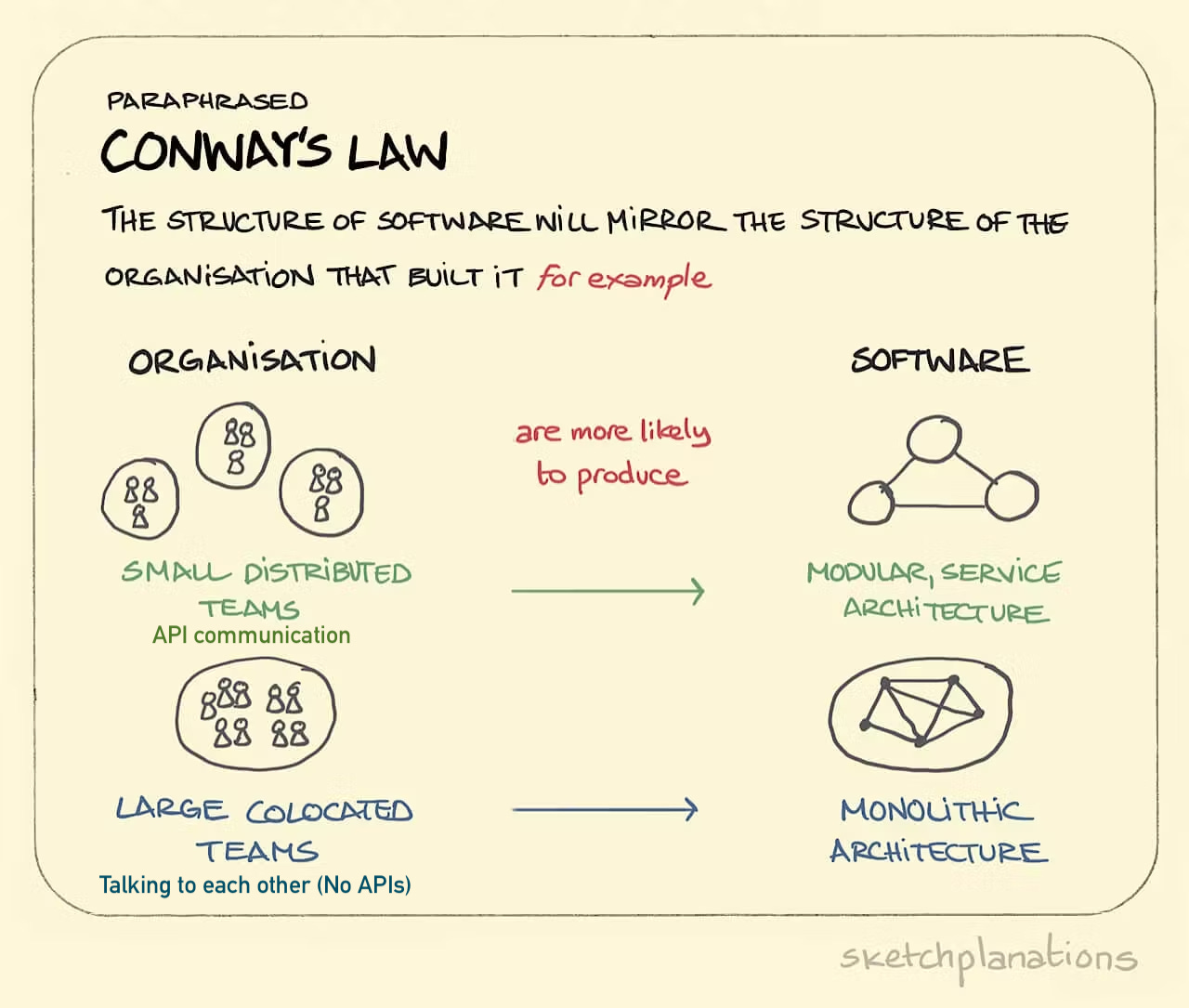
Hence, if your company is stuck on this communication pattern where all teams need to be talking with each other continuously to do anything (deploy, make a change etc), throwing more communication at the problem won’t solve the underlying issues of why people need to constantly talk to deliver their work. You must go back to the drawing board, revise your architecture and ensure that you organize your teams in a way that they can communicate with the proper boundaries (i.e well-designed APIs).
Why having your work speak for itself is better
You won’t always be around. Whether you are on holiday leave or left the company, if your work speaks for itself then there is no need for you to be there.
People won’t waste their time asking you questions. If multiple teams depend on your work, this problem grows exponentially and company’s time is wasted
People won’t waste your time asking you questions about your work or how to use it.
You abstract or condense your expertise for others to consume and do their job more efficiently.
You dramatically improve the developer experience of other engineers in the company by reducing friction, helping them get into the flow and maintain it.
How to make your work speaking for itself
There are three areas of work as communication I am going to cover here. First is cross-team communication, the second is communication within the team and lastly will be company-wide communication. The type of work as communication will differ for the three of them, but the idea is the same.
Cross team communication: Get better at UX
The way the book team topologies classifies the three major interaction modes across teams is as follows:
Collaboration: Discussion, feedback, understanding.
X-as-a-service: Providing a service for other teams.
Facilitating: consulting for another team to enhance their capabilities on a particular area, for example testing, security or SRE.
Most teams in an organization are (or should be!) stream-aligned teams, with a few platform and enabling teams to facilitate their work. The ultimate aim of stream-aligned and platform teams is to communicate using the x-as-a-service interaction mode the majority of the time, with occasional forays into collaboration mode to understand other teams and provide better APIs and services to serve each other.
Collaboration mode is rarely a good interaction mode to use on a permanent basis because it adds significant cognitive load to both teams operating in this way by extending the amount of interaction and scope of work a team needs to do to perform their job.
Collaboration is best as a temporary or cyclical form of interaction to use occasionally to perfect the boundary for X-as-a-service and provide a better user experience for the other team going forward.
In the interaction mode X-as-a-service it is absolutely crucial to deliver an API, library or tool for other teams to self-serve from your team and act as a communication boundary. This means that the team not only needs to have the technical know-how and capacity to create this boundary, they also need to be able to deliver it in a way that’s compelling and easy to use, in this sense, the design of your tool is your communication - the work speaks for itself.
Learning how to create compelling tools for other developers to use means understanding user experience, in other words, understanding what makes a tool a joy to use. This often involves:
Making it intuitive - Communicate with the app, don’t rely heavily on documentation.
Providing excellent feedback to the user - errors, information, signifiers and instant feedback explaining how to solve them
Make it safe to use, or safe to revert
Understand the personas using it, there may be more than just developers, or more than one type of developer. This is where collaboration as a form of interaction can help scope and understand this.
Don’t assume other teams will be familiar with your expertise or domain, understand what they need and provide easy solutions that leverage convention over configuration.
Reduce the number of steps as close to zero as possible for your users to see results.
Reduce the amount of time as close to zero as possible for the feedback loops to be as instantaneous as possible.
In other words, when you understand user experience and create an elegant, well-designed tool, your design speaks for itself, not Slack, not meetings, not even documentation, the design makes it easy for others to comprehend the intent, functionality and operation of your tool.
Notice I don’t use the term here DX, DevEx (Developer Experience) here. There are many posts out there that define DX as a glorified rebranding of UX. But UX is already a very mature discipline that you can draw from to create better developer tools. Contrary to popular belief, developers are humans too, hence they are also users, they are just users with a developer persona. For more about this topic, here.
Communication within the team: alignment
Members of a team will need to talk a lot more in order to communicate effectively, but this doesn’t mean that the talking should be aimless or overinflated, with too many meetings and slack messages.
Alignment, knowledge sharing and planning are three of the main reasons team members will have meetings and send messages to each other. The issue here is that if that’s where communication ends, the team will have many issues going forward:
How do we know what has been discussed in meetings? Even if the meetings are recorded, it’s not a good way to reference information
How do we keep track of all communication in slack? Too fragmented to be useful.
How do we enroll a new team member as quick as possible if the need arises?
Again, all of the problems above cannot be solved by talking alone, instead have work outcomes from your discussions, work that speaks for itself:
Write down style guides and ensure that everyone is in alignment with the way to write code best.
Write down your design principles, it amazes me how very teams and companies have this, without a document outlining your design principles, everyone will come with different types of solutions. For example one may favor convention over configuration while another may not. These design principles documents are even good to share across multiple teams to ensure a cohesive design.
Write down your architecture decisions and why you made them. This also includes your reasoning behind picking one tool over another. These can always be referenced and re-discussed at other meetings and change where needed.
Ensure your code is clear, easy to read and commented where pertinent, remember it’s not just you looking at it.
Ensure your PRs are clean, easy to read, contain small changes and are fully functional. Squash multiple commits that are not functional into one before merging to trunk. Every commit on the trunk should be a functional commit with a message explaining what it is and a ticket reference where it applies.
Package your application well - Remember that code is run more than it’s read so the better you package your application to easily run it across multiple environments, the better. This is not for your team, but for other teams as well. Make it as self-contained as possible (containers) or very easy to build and run with as close as zero dependencies as possible.
Document as part of your code. Don’t have the documentation on a separate wiki location as an addendum. Documentation must be part of your release process. Automate referential documentation as much as you can, handcraft how to guides, examples and getting started “recipes” if you have to.
Favour async for status updates (no need for daily standups). Use meetings for discussions and decision making with a small group of people familiar with the topic. Leverage ticketing or project management tools to keep everything in one place and easy to track
The ultimate goal of the work that you create to communicate with present and future team members is to ensure you are aligned and working in harmony towards a shared goal. Talking alone does not create alignment but it helps you create work that communicates it more efficiently and sustainably.
Company-wide communication: developer portals
We talked about inter-team communication and communication within the team, but then there is also company-wide communication that provides context, vision and alignment for multiple engineering teams. There are usually four places where this is done:
Meetings, such as all-hands meeting: These are often recorded, but it requires people’s attention for half an hour
Slack (general channel or others): Information can be fragmented or “lost”
Internal wiki: Often ends up in many duplicates, generally not a live source of information
Email (Seen as quaint these days, but I think in many ways is more effective than Slack): I think in many ways it’s more effective than an all-hands meetings, or a nice companion to it, if it summarizes all the key points.
So what is a more modern alternative to all of these for companies with multiple engineering teams? I say internal developer portals are a good contender. That’s not to say that developer portal would replace all those four, but it can help reducing the reliance on tools that were not designed to provide this type of context and streamline the process as much as possible.
Developer portals requires some work to keep fresh and up to date, but once you add all integrations and set it up it provides a more accurate and live view of your software architecture spanning multiple teams than a wiki, Slack or a spreadsheet does. An engineer can easily see at a glance:
How a service relates to other services.
Integrations that give a live view of the service and its status (last deployment, security issues, maturity, etc.)
Documentation for the service at a glance
Who owns it, who you can you talk to for help.
This is better than scouring Slack for context or information, asking team members or searching the wiki, the portal should give all the context needed for each service. Including what’s the status, what you need to get started, API documentation and how it works.
It also makes it much easier to enroll new engineers by giving them all the context needed in one place, rather than having them try to hit a piñata of multiple locations to get context.
Very small companies or one team startups have very little for these portals because setup may be more cumbersome than it’s worth it, but as companies grow and become very large, a developer portal or similar tool is crucial to communicate context of all the services in one place.
Conclusion
Communicating by talking is necessary for planning, discussion, understanding and alignment, but it is only a middle step to creating work that can speak for itself without having to continuously repeat yourself.
Communicating with work has exponential benefits the more a company grows in size, and doing it helps reduce and eliminate friction for multiple engineering teams and dramatically improve developer experience.
About me
Fernando Villalba has over a decade of miscellaneous IT experience. He started in IT support ("Have you tried turning it on and off?"), veered to become a SysAdmin ("Don't you dare turn it off") and later segued into DevOps type of roles ("Destroy and replace!"). He has been a consultant for various multi-billion dollar organizations helping them achieve their highest potential with their DevOps processes.